hexo(Next主题)修改文字大小

  在hexo搭建完成后,使用next主题,发现有些字体过大,比如标题下面提示文章发表时间、分类、标签等字体。以下提出我的修改方式(版本hexo:3.9.0、next:7.4.1)。

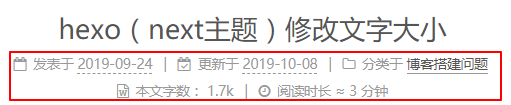
  默认建好之后,如下图所示,我对框中的字体大小不满意。

  首先想到要去主题配置文件_config.yml查找Font以便于修改字体大小。通过搜寻,可以看到以下的结果:

1
2
3
4
5
6
7
8
9
10
11
12
13
14
15
16
17
18
19
20
21
22
23
24
25
26
27
28
29
30
31
32
33
34
35
36
37
38
39
40
font:
# Use custom fonts families or not.
# Depended options: `external` and `family`.
enable: false

# Uri of fonts host, e.g. //fonts.googleapis.com (Default).
host:

# Font options:
# `external: true` will load this font family from `host` above.
# `family: Times New Roman`. Without any quotes.
# `size: x.x`. Use `em` as unit. Default: 1 (16px)

# Global font settings used for all elements inside <body>.
global:
external: true
family: Lato
size:

# Font settings for site title (.site-title).
title:
external: true
family:
size:

# Font settings for headlines (<h1> to <h6>).
headings:
external: true
family:
size:

# Font settings for posts (.post-body).
posts:
external: true
family:

# Font settings for <code> and code blocks.
codes:
external: true
family:

  可以看出只有全局、题目、多级标题、文章、代码的字体设置,并没有细致到我们需要的位置,于是我思考一定有一个地方设置了多种不同情况下所用到字体的大小。通过各方面的搜索,发现在themes\next\source\css\_variables下的base.styl中有这么一块:

1
2
3
4
5
6
7
8
9
10
// Font size
$font-size-base = 1em;
$font-size-base = unit(hexo-config('font.global.size'), em) if hexo-config('font.global.size') is a 'unit';
$font-size-smallest = .75em;
$font-size-smaller = .8125em;
$font-size-small = .875em;
$font-size-medium = 1em;
$font-size-large = 1.125em;
$font-size-larger = 1.25em;
$font-size-largest = 1.375em;

看到了和我猜想一样的设置了不同情况下的字体的大小,其中font-size-smallest控制的就是红框中的字体大小,我进行了如下修改:

1
2
3
$font-size-smallest       = .65em;
$font-size-smaller = .75em;
$font-size-small = .8em;

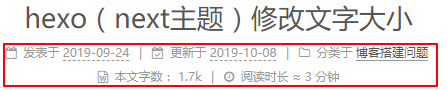
  结果如下:

  在页尾处的字体大小由$font-size-small控制,修改后结果如下: